

Mastering the Art of Requesting Annual Leave in the UK
Posted by Robin on 15 Feb, 2026 in
Before you even dream of booking that well-deserved holiday, there's a crucial first step: understanding exactly what you're entitled to. Requesting annual leave is much more than just picking dates; it's about knowing your rights, your company's specific rules, and how it all fits together.
Understanding Your Annual Leave Rights
Let's get the fundamentals right. Before you start planning, you need a crystal-clear picture of your holiday allowance. This isn't just one number; it's a mix of your legal entitlement, your company's specific policies, and how things like bank holidays are handled. Getting this sorted from the outset prevents any misunderstandings and makes sure your request is solid from the get-go.
The Legal Minimum Entitlement
First things first, UK law has your back. You are legally entitled to 5.6 weeks of paid holiday each year. For someone working a standard five-day week, that translates to a straightforward 28 days. This is the absolute minimum set out by the Working Time Regulations.
Now, a common point of confusion is bank holidays. Employers can, and often do, include the eight bank holidays within that 28-day total. However, many businesses offer more than the statutory minimum as a perk. Don't be surprised to see offers of 22-23 days plus bank holidays, which is a common package in the UK.
Company Policies and Contractual Leave
Your employment contract is the ultimate source of truth here. Always check it first. Many companies offer more generous leave packages, known as contractual leave, to attract and retain staff.
But the total number of days is only half the story. Your company's policy will also lay out the ground rules you need to follow:
- Accrual System: Does your leave build up month by month (accrued), or do you get your full allowance on day one of the leave year?
- Carry-Over Rules: Can you carry unused days into the next year? If so, there will be a limit on how many and a deadline for using them.
- Leave Year Dates: Does your company’s holiday year run from January to December, or does it follow the financial year (April to March)? This catches a lot of people out.
Understanding these details is non-negotiable. I've seen countless requests rejected instantly because someone tried to book leave they hadn't earned yet or attempted to carry over too many days past the deadline.
To help you get organised, here’s a quick checklist of things to confirm before you put in your request.
Employee Pre-Request Checklist
This simple table breaks down what you need to verify before submitting any annual leave request. Ticking these boxes will dramatically increase the chances of your request being approved without a hitch.
| Check | Description | Why It Matters |
|---|---|---|
| Total Allowance | Confirm your total number of days/hours from your contract or HR system. | Prevents requesting more leave than you're entitled to. |
| Leave Year | Know the start and end dates of your company's holiday year. | Ensures you use your allowance within the correct timeframe. |
| Accrual Rules | Understand if leave is available upfront or earned over time. | Avoids booking leave you haven't technically accrued yet. |
| Carry-Over Policy | Check the rules for carrying unused leave into the next year. | Prevents losing holiday days by missing the carry-over deadline. |
| Notice Period | Find out how much notice your company requires for leave requests. | Gives your manager enough time to plan for your absence. |
| Team Calendar | Check for clashes with colleagues' holidays, especially in small teams. | Shows you've considered team coverage and reduces the chance of rejection. |
Getting these ducks in a row makes the whole process smoother for both you and your manager. It shows you're organised and respectful of the company's policies.
Calculating Entitlement for Part-Time Staff
What if you work part-time? The 5.6-week entitlement still applies, but it's calculated on a pro-rata basis to keep things fair.
The maths is pretty simple. For instance, if you work three days a week, your calculation would be: 3 days × 5.6 weeks = 16.8 days of paid leave per year. This ensures that every employee gets their rightful amount of rest, no matter their working pattern.
If you want to dive deeper into the specifics, you can learn more in our ultimate guide to UK statutory holiday allowance.
The Art of Timing Your Holiday Request
Getting that much-needed time off often boils down to one simple thing: timing. Requesting annual leave isn't just about hitting the minimum notice period buried in your contract. It's about being strategic. A well-timed request shows you're thinking about the team's workflow and massively boosts your chances of getting a quick "yes".
Put yourself in your manager's shoes for a second. They're juggling project deadlines, making sure there’s enough cover, and dealing with everyone else’s requests. When you drop your holiday plans on them well in advance, you give them breathing room to plan. It’s a proactive move that turns a potential headache into a simple bit of admin.
Giving Ample Notice
Here’s the golden rule: give as much notice as you possibly can, especially if you’re planning a longer break. Your company policy might state that the notice period only needs to be twice as long as the leave itself (say, two weeks' notice for a one-week holiday), but treating this as a target is a mistake. Think of it as the absolute bare minimum.
If you're planning a two-week summer getaway, don't wait until a month beforehand. Get that request in three to six months in advance. This is even more crucial for those popular times like school holidays or Christmas, when you’re basically in a race with your colleagues for the same dates.
A last-minute request, even if it’s technically within the rules, just creates stress for everyone else. Planning ahead shows respect for your colleagues and their workloads, and that’s the kind of thing that builds a great team culture.
Aligning With Business Cycles
Before hitting 'submit' on that request, take a step back and look at the bigger picture. Are you right in the middle of a critical project? Is the team heading into its busiest quarter of the year? Asking for time off during a peak period is one of the fastest ways to get your request rejected.
To avoid that awkward conversation, get familiar with the rhythm of the business:
- Project Deadlines: Have a quick look at the project roadmap. You don't want to be asking for time off in the final weeks before a big launch.
- Seasonal Peaks: If you work in retail, the run-up to Christmas is probably a no-go zone. For an accountancy firm, it'll be the end of the tax year. Know your blackout dates.
- Team Availability: This is a big one. A quick glance at the shared calendar is a must. If two other people on your team are already booked off, your chances of getting approval are pretty slim.
This is where a tool like Leavetrack comes in handy. It gives you a central team planner, so you can see who's off and when at a glance. You can spot potential clashes before you even ask, saving both you and your manager a bit of back-and-forth.
Navigating Peak Holiday Seasons
Trying to book leave during the summer holidays or over the festive break requires a bit more finesse. These are the most sought-after dates, and managers have to balance being fair with making sure the business is still running. If you want time off then, planning is everything.
Get your request in as early as you can—sometimes even up to a year in advance if your company allows it. It’s also a good idea to have a quick chat with your manager about your plans first. A simple heads-up can help them manage expectations across the rest of the team. And be prepared to be a little flexible; you might have to compromise on the exact dates to make sure everyone gets a decent break.
How to Write a Clear and Professional Leave Request
The way you ask for time off says a lot about you as a professional. A vague, rushed message just creates extra work for your manager. In contrast, a clear, well-structured request makes the whole approval process a simple box-ticking exercise. Getting this right from the start means you’ll get a faster, more positive response.
Crafting a request that’s both clear and professional comes down to good effective communication skills. It’s not about being overly formal, but about giving your manager all the info they need in one go, so they don’t have to chase you for details.
The Core Components of Any Leave Request
It doesn't matter if you're sending a quick Slack message or filling out a formal HR form. Every single request for annual leave needs to contain the same key bits of information. Miss even one, and you’ll likely cause delays.
Your request absolutely must include:
- Specific Dates: Don't just say "next week." Be precise. State the exact start and end dates of your proposed leave, like "Monday, 12th August to Friday, 16th August."
- Total Number of Days: Clearly state the total number of working days you're taking off. This helps your manager and HR quickly calculate the deduction from your remaining balance.
- A Brief Handover Note: You don't need to write a novel. A simple sentence showing you’ve thought about your workload makes a huge difference. Something like, "I'll make sure all my urgent tasks are completed or handed over before I leave."
This isn’t just about being polite; it shows you’re responsible. It tells your manager that you’re thinking about the team's productivity, not just your upcoming holiday.
Tailoring Your Request to the Platform
How you ask for time off often depends on what your company prefers. A casual Slack message might be fine in a small startup, whereas a larger corporation will probably have a dedicated HR system you need to use. Each platform requires a slightly different touch.
Most companies use email, instant messaging, or a dedicated HR tool. Let's break down how they compare.
Comparing Leave Request Methods
| Method | Pros | Cons | Best For |
|---|---|---|---|
| It’s formal and creates a clear paper trail. You can also include detailed handover notes. | Can easily get lost in a busy inbox, leading to slower response times. | Official requests, longer periods of leave, or situations where a clear record is important. | |
| Slack/Teams | Very quick and informal, allowing for instant clarification if needed. | Can feel too casual for formal record-keeping. It's also easy for notifications to get missed. | Quick, short-notice requests (like a single day off) or as an initial heads-up to your manager. |
| HR Software | It's centralised, automatically tracks your leave balance, and often links with calendars. | Can feel rigid and impersonal. You often lose the context you could add in an email. | Companies with established processes that need automated tracking and reporting. |
Ultimately, choosing the right method comes down to your company's culture and official policies. When in doubt, go with the more formal option.
Whichever method you use, the core principles never change: be clear, be concise, and provide all the necessary information upfront. An automated tool like Leavetrack streamlines this by prompting you for the essential details, ensuring nothing gets missed.
Even when you use a formal system, sending a quick, polite message to your manager on Slack is a nice touch. It shows consideration and keeps them in the loop. For more specific examples, check out our guide with 7 perfect request for annual leave email templates for 2025 that cover just about any situation you can think of.
A Manager's Guide to Handling Leave Requests
When a team member asks for time off, you’re doing more than just clicking an ‘approve’ button. You're the crucial checkpoint, tasked with balancing an employee's well-deserved break with the operational needs of the business. Getting this process right—making it fair and efficient—is fundamental to team morale and productivity.
A consistent process builds trust and avoids any whispers of favouritism. For managers, mastering this flow is a huge time-saver. Think about how you can streamline your document approval workflow for all requests, not just holiday leave, to make everyone's life easier.
The Essential Approval Checklist
Before you give any request the green light, run through a quick mental checklist. It’s about more than just checking if the employee has enough days left. A rushed approval can cause a ripple effect of disruption later on.
Your primary checks should always cover these bases:
- Leave Balance Verification: Does the employee actually have the entitlement to cover the request? An automated system makes this a non-issue, saving you from manual calculations.
- Team Coverage Assessment: Who else is already booked off? Overlapping holidays, especially in smaller teams, can grind critical work to a halt.
- Deadline and Project Impact: Does the requested time clash with any major project deadlines, important client meetings, or seasonal busy periods?
- Handover Plan Clarity: Has the employee thought about how their responsibilities will be covered? It’s a sign of professionalism and makes the process smoother for everyone.
This visual shows the simple path an employee follows to get their request into your queue.
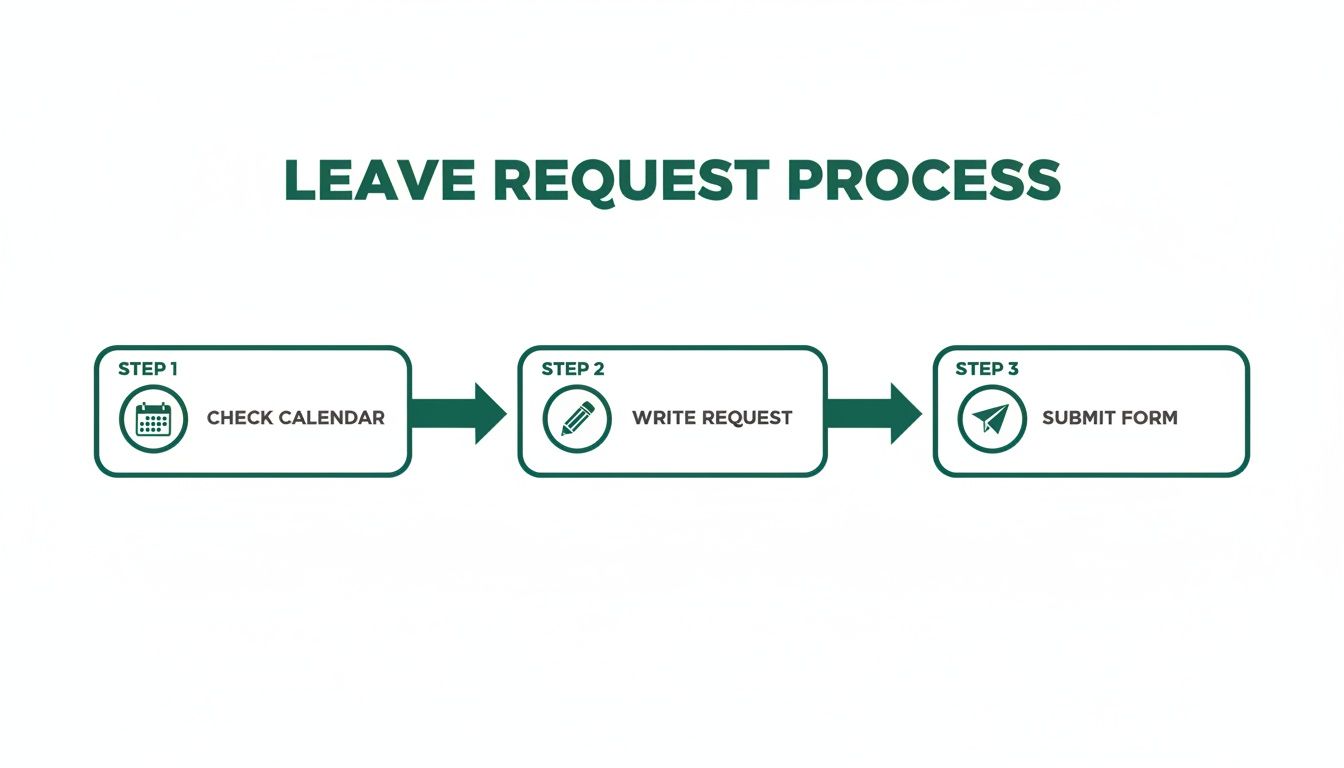
The key here is that the employee is responsible for checking calendars first. That initial step is the best way to prevent obvious clashes before they even reach you.
The Problem with Spreadsheets and Email Chains
So many businesses are still stuck using spreadsheets to track time off. It might seem simple, but this approach is riddled with problems. Data entry errors are almost guaranteed, version control becomes a nightmare, and you have zero real-time visibility. You can't see at a glance who is off, which leads to accidentally approving overlapping leave.
An email-based system isn't much better. Requests get buried in overflowing inboxes, approval chains become a tangled mess, and there’s no central record without someone painstakingly updating a separate document.
A dedicated absence management tool removes all the guesswork. It gives you a single source of truth, showing team availability on a shared calendar and flagging potential clashes before you can approve them. This immediate visibility is a genuine game-changer.
Handling a Leave Request Rejection
Declining a request is one of the trickiest parts of being a manager, but sometimes it’s just not possible. The key is to handle it with transparency and empathy. Never just say "no" without a clear, business-focused reason.
Explain the operational conflict—maybe it’s a critical project deadline or a lack of team cover. If you can, offer alternative dates. This shows you're supporting their need for a break, just not at that specific time. A clear, consistent, and fair process is the bedrock of a healthy team dynamic. And once the leave is approved, don't forget the next steps of preparing for an employee going on holiday.
Common Holiday Request Mistakes to Avoid
Even a process as seemingly simple as booking a holiday can go wrong surprisingly easily. A few common slip-ups can create a whole lot of friction and frustration for everyone involved. By getting ahead of these common pitfalls, both employees and managers can keep things running smoothly.
For employees, the biggest mistake is usually a case of pure optimism: booking flights and hotels before getting your leave officially signed off. This puts your manager in a really awkward spot and cranks up the pressure on what should be a simple request. Always, always wait for that confirmation before you commit to any non-refundable plans.
Another classic misstep is submitting a request with a vague or non-existent handover plan. Just putting your dates in the system isn’t enough. Forgetting to outline how your critical tasks will be handled while you're away just creates more work for your colleagues and manager, and it doesn't reflect well on you.
Managerial Missteps in Handling Leave
Managers aren't off the hook, either. One of the most damaging mistakes is applying the rules inconsistently. If you let one person take time off during a known busy period but tell someone else they can't, you’re asking for trouble. It breeds resentment, damages morale, and makes you look like you’re playing favourites. Fairness has to be consistent and transparent.
Poor communication is another major issue, especially when you have to decline a request. A flat "no" with no explanation is just demoralising. A good manager will always provide a clear, business-related reason for the rejection, whether it’s a major project deadline or a lack of team cover on those specific dates.
When a leave request is denied, the reason behind the decision is just as important as the decision itself. Clear communication builds trust, whereas silence or inconsistency erodes it.
It also helps to offer alternative dates. This softens the blow and shows that you support your employee's need for a break, even if their original timing just doesn't work for the business.
Creating a Fair and Transparent Process
Thankfully, most of these common errors can be avoided with clear policies and the right tools. A well-documented leave policy immediately sets expectations for everyone on notice periods, blackout dates, and handover procedures. There’s no room left for guessing.
This is exactly where a central system like Leavetrack comes into its own. It acts as a single source of truth, making your policies visible and accessible to the whole team. The shared calendar stops employees from even requesting dates that clearly clash with their colleagues' holidays.
For managers, it ensures every single request is funnelled through the same fair, consistent workflow, which practically eliminates the chance of accidental favouritism. It turns what could be a series of potential headaches into a simple, organised procedure that works for everyone.
Annual Leave FAQs: Your Questions Answered
Even with the clearest policies, real-life situations always throw up tricky questions about annual leave. It's a common area of confusion for both employees and managers. Let's tackle some of the most frequent queries that land in our inbox.
It's one thing to have the rules written down, but what happens when things don't go to plan? For instance, what if you get sick right before a long-awaited trip? Knowing your rights and the proper procedures helps everyone handle these moments with confidence.
Can My Employer Cancel My Approved Leave?
In short, yes, they can. While it’s not a great feeling, an employer is legally allowed to cancel annual leave that has already been approved.
However, they can't just spring it on you. They must give you a notice period that is at least as long as the holiday you had booked. So, if you had a one-week holiday planned, they have to tell you at least one week before it starts.
If this happens, you shouldn't be left out of pocket for flights or hotels you've already paid for. A reasonable employer will almost always cover these costs, though it's worth checking your contract as it's not a strict legal requirement unless stated.
What Happens If I'm Sick During Annual Leave?
Falling ill just before or during your holiday is frustrating, but you don't have to lose your leave days. You have the right to convert your annual leave into sick leave.
To do this, you must follow your company's usual sickness reporting process immediately. This simple step means you can reclaim those holiday days to use later when you're actually well enough to enjoy them.
Don't forget to get a doctor's note if your company policy requires one, even if you fall ill abroad. It’s the key to making sure you can bank those precious holiday days for another time.
Can My Employer Make Me Take Holiday?
Yes, they can. It's quite common in industries like manufacturing or education for a company to have a mandatory shutdown period, for example over Christmas or during the summer.
To enforce this, they have to give you the correct notice. The rule of thumb is that the notice period must be at least twice as long as the leave they're making you take. For example, if they want you to take one week off, they need to give you at least two weeks' notice.
Juggling these rules and scenarios is so much easier with a proper system. Leavetrack offers a clear, shared calendar and policy tracking that cuts through the confusion, making sure everyone is on the same page. Find out more at https://leavetrackapp.com.