
A Guide to Your Next Employee Holiday Planner
Posted by Robin on 03 Feb, 2026 in
An employee holiday planner is the system you use to track, manage, and approve your team's leave requests. At its best, it's the central hub for coordinating time off, making sure projects stay on track and everyone gets a fair shot at the dates they want. At its worst... well, it's a spreadsheet.
Why Spreadsheets Are Holding Your Team Back
Let's be honest: managing holidays on a spreadsheet is a recipe for a massive headache. For so many UK businesses, that shared Excel or Google Sheet feels like a rite of passage. It starts simply enough, but before you know it, you're lost in a maze of clashing colour codes, version control nightmares, and hidden formulas that break at the worst possible moment.

This manual approach is just loaded with real-world frustrations. Just think of that last-minute scramble to find a request buried in a forgotten email chain. Or the tedious job of manually calculating pro-rata holiday for a new part-timer. Even something as basic as adding different leave types often means you have to painstakingly create custom dropdowns just to keep things organised.
These little administrative tasks add up, creating some serious operational risks and draining precious time from your managers.
The True Cost of Manual Tracking
The problem with spreadsheets isn't just that they're inconvenient; it's the damage they do to morale and efficiency. When the process for booking time off feels unfair or chaotic, it creates friction. People get frustrated when their requests are missed, and managers get bogged down in admin instead of actually leading their teams.
We see the same pain points come up again and again with manual holiday planners:
- Scheduling Clashes: Without a live, central view, it’s far too easy to accidentally approve overlapping holidays for critical team members, leaving you short-staffed during a key project.
- Calculation Errors: Manually tracking holiday balances, especially with carry-over rules and bank holidays thrown in, is riddled with potential mistakes that can lead to unhappy staff and even compliance issues.
- Lack of Transparency: Team members can't see who's off and when, which makes it almost impossible for them to plan their own leave collaboratively.
This matters more than ever. Recent data shows UK workers are now prioritising their time off, with the average employee leaving just 5 days of holiday untaken last year. That's a huge drop from pre-2019 levels as wellbeing rightly takes centre stage. An efficient, fair system is no longer a "nice-to-have"—it's a must.
A dedicated planner isn't just a tech upgrade; it's a fundamental tool for ensuring operational stability and boosting team morale. It transforms leave management from a reactive chore into a strategic function.
Moving to a proper system builds fairness and gives your team the clarity they deserve. You can learn more about the key benefits of absence management software and see just how big a difference it can make.
Building Your Foundation with a Clear Holiday Policy
Before you even think about an employee holiday planner, we need to talk about the foundation: your holiday policy. It's easy to get excited about a shiny new tool, but a planner simply automates the rules you give it. If those rules are confusing or inconsistent, you’re just buying a faster way to create chaos.
A rock-solid, well-defined holiday policy is the only way to build a fair and efficient system. It puts a stop to the endless email chains, clears up any grey areas, and gives managers the confidence to approve requests without second-guessing themselves. This isn't about creating red tape; it's about building a transparent framework that everyone in the company understands and trusts.
Defining Your Non-Negotiables
First things first, let's nail down the absolute essentials. These are the core pillars of your leave process, and they need to be written down where every single employee can see them. If you leave these open to interpretation, you're paving the way for inconsistency and claims of unfairness.
Your policy must clearly state:
- The Holiday Year: When does your leave year actually run? Is it a standard January to December, or does it align with your financial year, like April to March? This simple detail impacts everything from how leave accrues to when carry-over days expire.
- Notice Periods: How much warning does someone need to give before taking time off? It often makes sense to have different rules for different situations. You might ask for one week’s notice for a day or two off, but require a full month's notice for a two-week summer holiday.
- Carry-Over Rules: Can people carry unused days into the next holiday year? Be specific. State the maximum number of days and set a hard deadline. For example, "You can carry over up to 5 days, but they must be used by 31st March."
A policy isn’t just a document; it's a promise of fairness and predictability to your team. When the rules are clear, the process of requesting and approving leave becomes a simple administrative task, not a source of workplace friction.
This clarity is vital when planning around public holidays. To give you a real-world example, England and Wales have 8 public holidays scheduled for 2025. A whopping 75% of them fall on a Monday. That clustering of long weekends is a magnet for leave requests and can easily lead to skeleton crews if you haven't planned ahead.
Handling Pro-Rata and Peak Times
I've seen it time and time again: the two areas where manual spreadsheets cause the most headaches are pro-rata calculations and managing the holiday rush. Your policy needs to tackle both head-on.
Calculating leave for part-time staff or for someone who joined mid-way through the year is a classic pain point. Your policy should spell out the exact formula you use—whether it’s based on days or hours worked—to ensure everyone is treated fairly and you remain legally compliant. It removes the guesswork. Our guide on creating an annual leave policy template can walk you through this.
Likewise, you need firm rules for those high-demand periods like summer and Christmas. A simple "first-come, first-served" approach usually works best, but you have to define the booking window. Announce exactly when the calendar for those popular dates will open, and be upfront about any blackout periods where leave might be restricted due to critical business needs.
How to Choose the Right Holiday Planning Tool
Making the leap from a spreadsheet is a big decision, but finding the right tool doesn’t have to feel like a chore. The aim isn't to get the most complex, feature-packed software on the market; it's about finding a simple, effective employee holiday planner that your team will actually use.
Let's be honest, if a manager needs a user manual to approve a simple holiday request, you've already lost. The best systems feel intuitive from the get-go. Prioritise ease of use, smooth calendar integrations with tools your team already lives in (like Outlook and Google Calendar), and solid mobile access for those on-the-go requests and approvals.
The right tool should take the core logic of your policy and turn it into a simple, automated process, as the flow below shows.
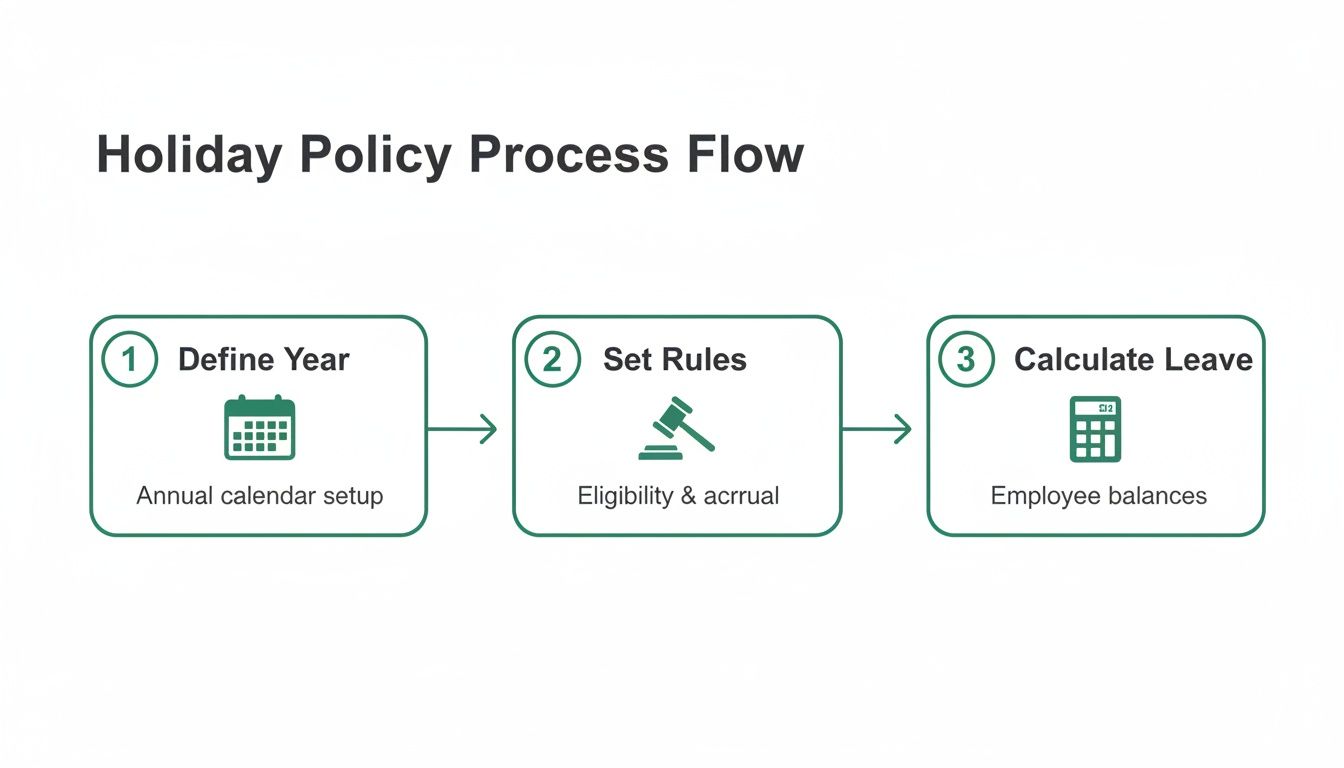
This is what a good system does—it handles the tedious calculations and rule-checking, freeing you up from manual admin.
From Chaos to Clarity: A Real-World Scenario
Picture a 50-person marketing agency stuck in spreadsheet hell. Holiday requests are fired off via email, and it's up to a manager to manually update the shared file. Mistakes are inevitable, leading to awkward scheduling clashes right before major campaign launches. Their first step is to figure out what's actually broken.
They quickly pinpoint their critical needs:
- A central team calendar: Everyone needs to see who is off and when, without sending a flurry of emails.
- Automated approval workflows: Requests must go directly to the right manager for a simple one-click decision.
- Accurate entitlement tracking: Balances need to update automatically, especially for their part-time staff with pro-rata allowances.
With these priorities clear, they can immediately filter out the overly complicated, all-in-one HR suites. Their focus shifts to specialised absence management solutions built for leave tracking. They find a platform that lets them configure their specific carry-over rules, set up individual employee profiles, and create an approval chain that pings managers directly in Slack or via email. Problem solved.
The real test of any holiday planner is how it performs under pressure. A good system prevents clashes during the summer rush and gives managers the instant data they need to make fair, informed decisions without digging through spreadsheets.
This isn't just about efficiency; it's about holding onto your best people. Recent UK research found that while 89% of workers stay productive during the festive season, a massive 76% are planning major career changes in the new year. A huge part of that reflection involves their work-life balance and how their employer handles time off. A fair, transparent system can genuinely make a difference. You can read more about the UK worker productivity and career plans on hrdconnect.com.
Must-Have Features to Look For
When you start comparing options, it's easy to get bogged down in jargon. Just focus on the practical features that will have the biggest impact on your day-to-day. Your checklist should really boil down to three things: integrations, reporting, and customisation.
Look for a planner that offers solid integrations with the calendars your team already uses—it's a non-negotiable. It should also have clear reporting features that let you export data to analyse absence trends or track leave liability for the finance team. Finally, make sure the tool is customisable enough to mirror your unique policy rules.
We've put together some more advice in our guide on choosing the right absence management solution.
Launching Your New System and Getting Team Buy-In
Putting a new employee holiday planner in place is one thing, but getting your team to actually use it and feel good about it? That’s a whole different ball game. A new system is only ever as good as its adoption rate, which means a successful rollout is less about the tech and more about smart, benefit-driven communication. The goal is to make this change feel like a genuine upgrade for everyone.
The secret is framing the launch around what your employees actually care about. Forget talking about "process efficiency"; talk about how they can now see their remaining holiday balance instantly on their phone. Instead of mentioning "data centralisation," explain that they’ll get approval notifications in minutes, not days. This approach shifts the whole conversation from a mandatory HR change to a tool that genuinely makes their lives easier.
Your Practical Launch Checklist
A smooth launch all comes down to good preparation and clear communication. You need to show your team that this new system isn't just replacing the old spreadsheet—it's actively solving its most frustrating problems. A well-planned rollout shows you’ve thought about their experience from the get-go.
Here's how I'd approach it:
- The Pre-Launch Teaser: About a week before you go live, send out a short, upbeat email announcing the change. Highlight two or three key benefits that will resonate, like "instant team visibility" or "one-click holiday requests." Keep it brief and exciting.
- The Go-Live Announcement: On launch day, send a more detailed announcement. This should have clear login instructions and, crucially, a link to a short training video. I've found that 5-7 minutes is the sweet spot for these things – long enough to be useful, short enough that people will actually watch it.
- Manager Briefing: Hold a separate, quick session just for your managers. Walk them through exactly how to approve requests and view their team’s calendar. If they feel confident from day one, that confidence will trickle down.
- Integrations and Access: Make sure any integrations with tools like Slack or Outlook calendars are switched on from the very beginning. When the planner feels like part of their existing workflow, adoption happens almost automatically.
The goal of your launch is to remove friction. By focusing on employee benefits and providing easy-to-digest training, you turn adoption from a chore into an obvious choice. A system that works within their favourite tools will always win.
Communicating the Benefits to Your Team
When you introduce the new system, frame it as the solution to all those shared frustrations. Don't be afraid to acknowledge the pain points of the old method—the endless email chains, the uncertainty over whether a request was even seen, the difficulty in planning around colleagues. This shows you understand what they've been dealing with and have found a better way.
Position the new holiday planner as a tool for empowerment. Explain how it gives them total transparency, letting them coordinate time off with teammates without having to ask a manager for the latest version of the calendar. This simple shift in control can do wonders for team morale and cuts down the admin burden for everyone. Suddenly, the new system isn't another top-down mandate; it's a welcome change.
Managing and Optimising Your Planner for the Long Haul
Getting your new employee holiday planner up and running is a great first step, but its real value comes to light over time. This isn’t a ‘set it and forget it’ solution. You need to think of it as an active part of your workforce management strategy, one that needs regular attention to deliver the best results for your business and your team.
Effective long-term management turns your planner from a simple request tool into a source of vital business intelligence. It’s an ongoing process that ensures your system grows with your company, stopping small issues from turning into major operational headaches down the line.
When you're managing and optimising your planner for the long haul, it's essential to integrate it with your overall strategic staffing plan to ensure business continuity and efficient resource allocation.
Handling Clashes and Ensuring Coverage
Even with the best system in the world, you’ll inevitably run into scheduling clashes. This is especially true during popular periods like the school summer holidays or over Christmas. The goal isn’t to eliminate them completely—that’s impossible—but to manage them fairly and transparently. Your policy should already lay out the ground rules, which is typically first-come, first-served.
But your planner gives you powerful tools to be proactive, not just reactive.
- Set Minimum Staffing Levels: You can configure your system to automatically flag or even block requests that would dip a department below its minimum operational cover. This takes the pressure off managers and removes them from being the 'bad guy'.
- Encourage Team Collaboration: A visible, shared calendar often empowers team members to sort out potential clashes among themselves. Many times, they can resolve it before a manager even needs to get involved.
- Communicate Booking Windows: For those peak seasons, announce the booking window well in advance. This simple step promotes fairness and cuts down on the last-minute scramble for popular dates.
Your aim here is to shift from reactive problem-solving to proactive resource planning. The data sitting in your holiday planner is the key to anticipating staffing needs before they become a real problem.
Using Reports to Uncover Insights
The reporting features in your holiday planner are your secret weapon for long-term optimisation. Regularly diving into this data can reveal patterns you’d never spot on a spreadsheet. It gives you a clear, objective look at how your team is actually using their time off.
For example, tracking leave accruals helps the finance team forecast liability far more accurately. But on a more strategic level, you can start to analyse absence trends. Are certain individuals or whole departments consistently taking very little leave? This could be an early warning sign of burnout on the horizon.
Likewise, a sudden spike in last-minute, single-day absences might point to underlying issues with workload or morale. By spotting these trends early, you can step in with supportive measures before they hit productivity and employee wellbeing. It's a data-driven approach that helps you make informed decisions that benefit both the business and your people.
Finally, make time for an annual review of your policy and the system itself. Does the approval workflow still make sense for how your teams are structured? Have team responsibilities changed? Keeping your planner aligned with how your business actually operates is what ensures it remains a valuable and effective tool for years to come.
Common Questions About Holiday Planners Answered
Rolling out a new employee holiday planner, or even just formalising an old process, is bound to bring up a few questions. I've gathered the queries that land in my inbox most often from HR managers and team leaders, so you can get clear, practical answers and manage your team's leave with confidence.
How Do We Handle Last-Minute Holiday Requests Fairly?
Fairness always comes back to consistency, which is why your written policy is your best friend.
First things first, define a clear and reasonable notice period for all standard holiday requests. This creates a baseline that applies to everyone, knocking any claims of favouritism on the head from the start.
But of course, life happens. Real emergencies crop up. The key is to give managers the discretion to approve these requests case-by-case, but only if they have the right information at their fingertips. This is where a digital planner is a game-changer; it lets a manager instantly see the team calendar, spot potential cover gaps, and say yes to an urgent request without throwing a spanner in the works.
What Is the Best Way to Manage Peak Seasons?
For those high-demand periods like Christmas or the summer holidays, a simple ‘first-come, first-served’ policy is usually the most transparent approach. Everyone understands it.
The secret is to communicate the booking window well in advance. For instance, you might send a team-wide memo saying, “Summer holiday requests can be submitted from 1st February onwards.” This gives everyone a fair shot.
A modern employee holiday planner can also be set up with minimum staffing levels. This means the system can automatically block a request if approving it would drop your team below its operational threshold, enforcing the rules fairly for everyone without a manager needing to step in.
How Can We Correctly Calculate Leave for Part-Time Staff?
Manually calculating pro-rata holiday entitlement is the single biggest reason spreadsheet-based systems fail. It’s a common headache that's not just time-consuming, but can also lead to serious compliance issues if you get it wrong.
Honestly, the most reliable and efficient fix is a dedicated absence management system. These tools automatically calculate the correct holiday allowance based on each employee's specific working hours or days.
When a part-time team member books a day off, the system deducts the correct pro-rata amount from their balance. This completely removes the risk of human error, ensures you stay legally compliant, and guarantees every employee gets exactly what they're entitled to without anyone having to touch a calculator.
Ready to replace spreadsheet chaos with streamlined efficiency? With Leavetrack, you can manage requests, track balances, and ensure fair coverage with a simple, intuitive employee holiday planner. Discover how Leavetrack can save you time and boost team morale.