
A Guide to Leave Management Systems for UK Businesses
Posted by Robin on 11 Jan, 2026 in
At its heart, a leave management system is a digital tool that takes the headache out of employee time off. It automates the entire process, from the initial request and approval right through to tracking balances and generating reports. Think of it as moving on from paper forms and messy spreadsheets to a smart, central platform that keeps everything accurate and compliant for your UK business.
Moving Beyond Spreadsheets and Paper Chaos
Have you ever tried to manage staff holidays using a shared spreadsheet? It’s a bit like running a busy restaurant where all the orders are scribbled on scraps of paper and passed around by hand. It quickly becomes chaotic, mistakes are made, and nobody has a clear picture of what’s happening. This is the reality for too many HR managers still wrestling with spreadsheets and endless email chains.
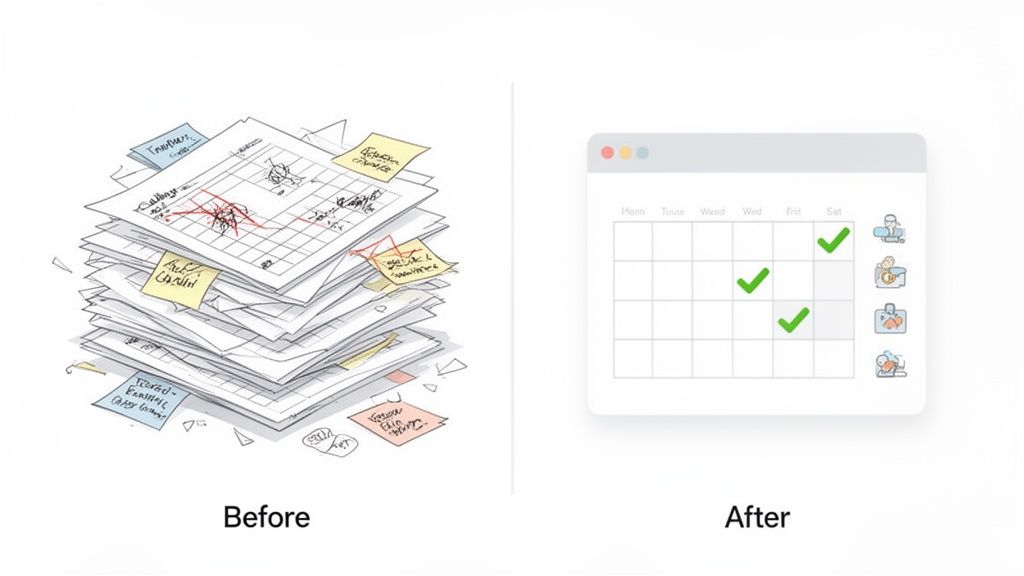
A leave management system is your modern, digital ordering system for that chaotic kitchen. It transforms a reactive, administrative nightmare into a proactive, strategic way of managing absence. Instead of you manually updating a wall planner, chasing managers for approvals, or triple-checking holiday entitlement calculations, the system just handles it.
The Problem with Manual Tracking
The real issue with doing things the old-fashioned way isn’t just about the time it eats up; it’s the hidden risks and bottlenecks it creates. For UK businesses, these problems can be especially painful.
- Compliance Risks: Manually calculating pro-rata holiday pay for part-time staff or tracking sickness absence against your official policy is a minefield. One slip-up can lead to serious compliance headaches.
- Lack of Visibility: It’s almost impossible to get a clear, up-to-the-minute view of who is off and when. This makes resource planning a guessing game and can leave teams dangerously understaffed at crucial times.
- Administrative Burden: HR teams and line managers burn countless hours just processing requests, answering the same questions about leave balances, and fixing simple data entry errors.
A dedicated system lets you stop being a leave administrator and start being a strategic partner. It gives you the data you need to spot absence trends, manage your workforce capacity effectively, and make sure everyone is treated fairly.
Manual Tracking vs Automated System: A Quick Comparison
When you put the old way of working side-by-side with a modern solution, the difference is night and day. The value of letting a system do the heavy lifting becomes crystal clear.
| Feature | Manual Tracking (Spreadsheets & Email) | Automated Leave Management System |
|---|---|---|
| Accuracy | High risk of human error in calculations and data entry. | Automated calculations ensure spot-on accuracy for holidays and balances. |
| Process | Inconsistent, manual requests via email, paper, or text. | Standardised, digital submission and approval workflows for everyone. |
| Visibility | Information is scattered across multiple files and inboxes. | A central calendar gives real-time visibility for the whole team. |
| Compliance | Hard to enforce policies consistently and track for audits. | Policies are built-in, ensuring consistent application and records. |
| Reporting | Takes ages to generate reports, often with outdated data. | Instant, accurate reports on absence trends and leave liabilities. |
This table neatly sums up the shift from a fragmented, error-prone process to a unified, reliable one.
Many modern leave management systems are delivered as Software as a Service (SaaS) solutions. Getting to grips with the underlying SaaS model can offer more insight into how these systems work and what to expect during implementation. Ultimately, making this switch helps you build a more organised, compliant, and efficient workplace—setting a solid foundation for your business to grow.
Diving Into the Core Features and Benefits
A proper leave management system is so much more than a fancy digital calendar. Think of it as the engine room for a workplace that runs smoothly, fairly, and efficiently. Its best features are built to solve the real, everyday problems that eat up HR's time and leave employees feeling frustrated. Let's pull back the curtain on the non-negotiable features and the real-world value they bring to the table.
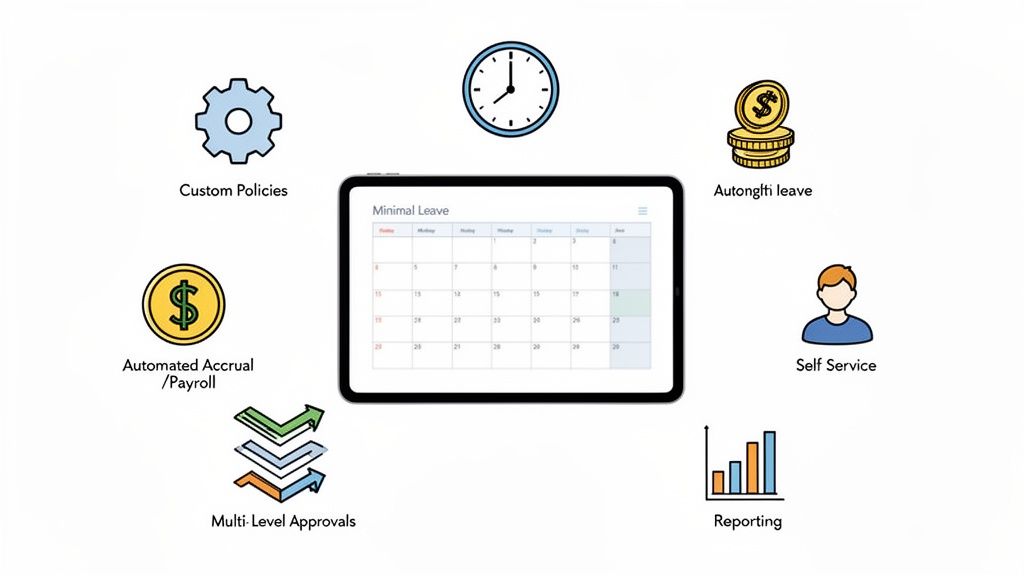
Centralised Leave Calendar and Wall Planner
Picture this: a single, live view of your entire company's absences, all in one place. That's the magic of a centralised calendar. It instantly wipes out the risk of being accidentally short-staffed during a huge project deadline or the Christmas rush.
Managers and team members can see at a glance who's off and when, which makes planning and teamwork a whole lot easier. This kind of visibility is the bedrock of good resource management, ensuring key responsibilities are always covered without any last-minute chaos.
Customisable Leave Policies and Types
Let's face it, UK employment contracts can get complicated. You've got different rules and allowances for full-time, part-time, and contract staff. A one-size-fits-all approach to leave just isn't going to cut it. A quality system lets you build and assign bespoke leave policies that match your unique business rules.
This means you can set up custom leave types that go beyond the usual holiday and sick leave. Think about things like:
- Volunteering days to back your corporate social responsibility goals.
- Training and development leave to properly track professional growth.
- Compassionate leave or dependant care leave, handled with the consistency and sensitivity they require.
When you define these policies in the system, you guarantee they're applied fairly to everyone, which cuts down on disputes and tedious admin.
Automated Accrual Tracking
Manually calculating holiday entitlement is a minefield, especially for people who join mid-year or work flexible hours. It's a recipe for mistakes. Getting it wrong can lead to incorrect holiday pay, which is a serious compliance breach in the UK.
Automated accrual tracking is your safety net. The system does the heavy lifting, calculating entitlements perfectly based on the rules you’ve set and automatically updating balances as leave is taken. This ensures total accuracy and frees up your HR team from soul-destroying, repetitive calculations.
This feature also gives employees a crystal-clear view of their remaining leave, which means fewer "how many days do I have left?" queries flooding the HR inbox. For management, it provides a precise picture of the company's leave liability at any moment.
Employee Self-Service Portals
Giving your employees more control is a cornerstone of modern HR. A self-service portal lets your staff manage their own leave without having to ping HR for every little thing. Through a simple, intuitive interface, they can check their balance, see the team calendar, and pop in a new request in just a few seconds.
When checking out systems, look for ones that offer easy-to-use interfaces for submitting and tracking dedicated time off request forms. This autonomy doesn't just make for a better employee experience; it slashes the administrative workload. Managers get a notification, and they can approve or deny a request with a single click, often straight from their email or a Slack message.
For smaller businesses just getting started, it's worth understanding the core wins first. You can learn more about the three key benefits of absence management software for SMEs in our guide.
Advanced Reporting and Analytics
Finally, a leave management system transforms raw absence data into powerful business intelligence. Instead of being lost in a sea of spreadsheets, your leave data becomes a strategic asset for spotting trends and making smarter decisions.
Typical reports you'll come to rely on include:
- Absence trend analysis to pinpoint patterns of sickness or spot potential burnout in certain teams.
- Leave liability reports to get your financial forecasting spot on.
- Bradford Factor scoring to manage and tackle problematic absenteeism in a consistent way.
These insights let you shift from being reactive to proactive. You can start managing your workforce strategically, supporting employee wellbeing, and making your operations as efficient as possible.
What’s the Real Business Impact of Automating Leave Management?
Let's look past the slick features for a moment. The real reason to get a leave management system is the direct impact it has on your business's bottom line. Automating leave isn’t just about making life easier; it’s a smart financial decision that delivers a clear and measurable return on investment (ROI). It turns those hidden, time-sucking costs into tangible efficiencies and gives you the data to plan better.
The first, most obvious win is how much administrative time you get back. Just think about it: how many hours does your HR team or office manager sink into manually keying in dates, double-checking calendars, answering "how much holiday do I have left?" queries, and chasing managers for approvals? All that time is reclaimed, freeing up your skilled people to focus on things that actually move the needle, like employee development and engagement, instead of getting bogged down in repetitive admin.
Cutting Out Errors and Getting a Grip on Finances
Manual processes are a breeding ground for mistakes, and those little slip-ups have real financial costs. A simple miscalculation in holiday pay can throw payroll into chaos, which doesn't just annoy employees—it can create genuine compliance headaches. An automated system sidesteps all of this by calculating entitlements perfectly every time, based on the rules you set.
This accuracy is a game-changer for financial planning, too. A spreadsheet gives you a hazy, often outdated, guess at your company's leave liability—that's the total cash value of all the accrued holiday your team hasn't taken yet.
A proper leave management system gives you a live, accurate figure for this liability. Your finance team can then forecast properly, and you won't get caught out by a massive, unexpected payout when a long-serving employee leaves.
You simply can't get that level of financial clarity from a tangled mess of spreadsheets and email chains. It turns a chaotic number into a predictable, manageable metric.
Using Absence Data to Build a Wellbeing Strategy
Lately, tracking absence has become about much more than just organising cover. It’s a crucial part of looking after your team's wellbeing. Without a central hub for data, it's almost impossible to spot patterns that might point to burnout or disengagement. A line manager might notice one person is taking a lot of sick days, but they have no way of knowing if it’s an isolated case or a trend spreading across the whole team.
This is where a dedicated system reveals what's really going on. By 2023, UK workforce surveys showed that the average sickness absence had jumped to 7.8 days per employee, a big increase from the 5.8 days we saw before the pandemic. A huge driver for this is stress, with over 76% of organisations citing it as a major cause. A system like Leavetrack helps HR spot these hotspots by analysing the data, allowing them to build a wellbeing strategy that's based on solid evidence. You can dig into the full details on UK absence trends to learn more.
A Boost for Productivity and Morale
When you add it all up, having a smooth, transparent process for time off has a surprisingly powerful effect on your company culture. It just works. Employees can request leave easily, see their remaining balance in a click, and get a quick response. It removes all the friction and frustration.
The system also ensures fairness because policies are applied the same way for everyone, which gets rid of any grumbling about favouritism. This straightforward, efficient approach gives morale a real lift, and better morale leads to better productivity. It sends a clear message that you value your employees' time—both when they're working and when they're not. Teams can plan ahead, managers aren't drowning in admin, and the whole business runs with a lot more clarity.
How to Choose the Right Leave Management System
Picking the right leave management system can feel overwhelming, but it doesn't have to be. With a bit of a framework, you can cut through the noise and find the software that genuinely fits your business. Think of it like picking the right tool for a specific job; you wouldn't use a sledgehammer to hang a picture. The real goal is to find a platform that solves your immediate headaches while being flexible enough to grow with you.
This means looking past the flashy sales pitches and focusing on what will actually make a difference to your day-to-day operations. You'll want to consider how easily the system can scale, how well it plays with the tools you already use, and, most importantly, how easy it is for your whole team to use.
Start with Your Core Needs and Scalability
Before you even book a single demo, sit down and map out your absolute must-haves. What are the biggest pain points with how you do things now? Are you tearing your hair out over accurate holiday calculations for part-time staff, or are constant scheduling clashes causing chaos? Make a simple checklist of your non-negotiables.
Scalability is another huge piece of the puzzle. A system that’s perfect for your team of 20 today needs to be just as effective when you hit 50 or 100 employees. Can the platform handle more complexity down the line, like multiple office locations or more intricate leave policies, without needing a complete overhaul? A good system should adapt to your business, not force your business to adapt to it.
Evaluate Usability and Employee Experience
Let's be honest, a powerful system is completely useless if your team finds it a nightmare to use. A clunky, confusing interface will just swap one set of problems for another. The best leave management system is one that your employees and managers actually want to use.
The ultimate test of good software is how quickly it becomes invisible in your workflow. It should feel so natural to request leave or approve a holiday that your team barely thinks about the process, freeing them up to focus on their actual work.
Look for a clean design, a simple request process, and a clear, at-a-glance view of leave balances. For managers, the approval workflow should be effortless, ideally letting them approve requests straight from an email or a Slack notification. A great user experience leads directly to high adoption rates, which is what you need to see a real return on your investment. For a deeper look at this, you can check out our guide on choosing the right absence management solution.
Check for Integrations and Policy Customisation
A leave management system shouldn't be an island. To be truly effective, it needs to connect with the other tools your business runs on.
- Calendar Integrations: It’s a must. The system has to sync seamlessly with tools like Google Calendar, Outlook, or Apple Calendar to keep everyone's schedules updated automatically. No more manual entries.
- Communication Tools: Look for integrations with platforms like Slack or Microsoft Teams. These can turn a multi-step approval process into a single click within the apps your team already lives in.
- Payroll Software: The ability to easily export leave data for payroll processing will save you hours of manual admin and cut out the risk of costly mistakes.
Policy customisation is just as critical, especially for UK businesses. Leave behaviour and rules can vary massively from one industry to another. For example, recent UK data showed that between 2022 and 2023, the construction sector saw a 10.98% drop in leave taken, while the water supply sector actually increased holiday entitlement. This just goes to show you need a system that can handle different policies, shift patterns, and custom accrual rules all at once, which you can read more about in this UK annual leave report by industry.
Prioritise Security and Support
Finally, whatever you do, don't overlook data security and customer support. You’re trusting the system with sensitive employee data, so it absolutely must be compliant with UK regulations like GDPR. Look for vendors who are open and transparent about their security measures, like data encryption and secure cloud hosting with regular backups.
Good customer support is your safety net. Before you sign anything, find out what kind of support is on offer. Is it available via email, phone, or live chat? A responsive and genuinely helpful support team can make all the difference, especially when you're getting set up or if you run into any unexpected hiccups later on.
Migrating From Spreadsheets to a Digital System
Making the leap from a trusty old spreadsheet to a dedicated leave management system can feel like a huge task, but it’s far more straightforward than you might think. This isn’t about some complex technical overhaul; it’s about swapping manual chaos for automated clarity through a simple, structured process.
Breaking it down into manageable steps makes the whole thing feel less intimidating and ensures a smooth switch for everyone involved.
Preparing Your Data for a Smooth Transition
The journey begins with the data you already have. Honestly, this is the perfect excuse for a bit of a spring clean. Before you can even think about importing anything, you need to be sure the information in your spreadsheets is accurate, consistent, and up-to-date.
Your first step is to pull all your scattered leave records into one master file. That means gathering data from different spreadsheets, trawling through old email threads, and maybe even digging out some paper forms.
Once everything is in one place, you can start to standardise the format. Make sure every single entry has the correct employee name, department, leave type, and dates. This is also the time to double-check and finalise everyone's current leave balance. A clean, accurate data set is the foundation for a successful migration and stops old errors from creeping into your new system.
For a more detailed walkthrough, check out our step-by-step guide to implementing an absence management system.
Configuring Policies and Onboarding Your Team
With your data prepped and ready to go, the next phase is setting up the new system to reflect your company's specific rules. This is where a modern platform really starts to shine.
You’ll set up your unique leave policies, define all the different leave types (like holiday, sickness, or volunteering days), and establish the approval workflows that dictate who needs to sign off on requests.
Once the system is configured, it’s time to bring your team on board. Don’t worry, this doesn’t require long, drawn-out training sessions. A simple kick-off meeting or a clear email explaining the benefits—like instant balance checks and easy mobile requests—is often more than enough. The key is to focus on how the new system makes life easier for them, which is the best way to get everyone excited about the change.
This visual shows the high-level thought process for selecting and implementing software, focusing on evaluation, integration, and security.
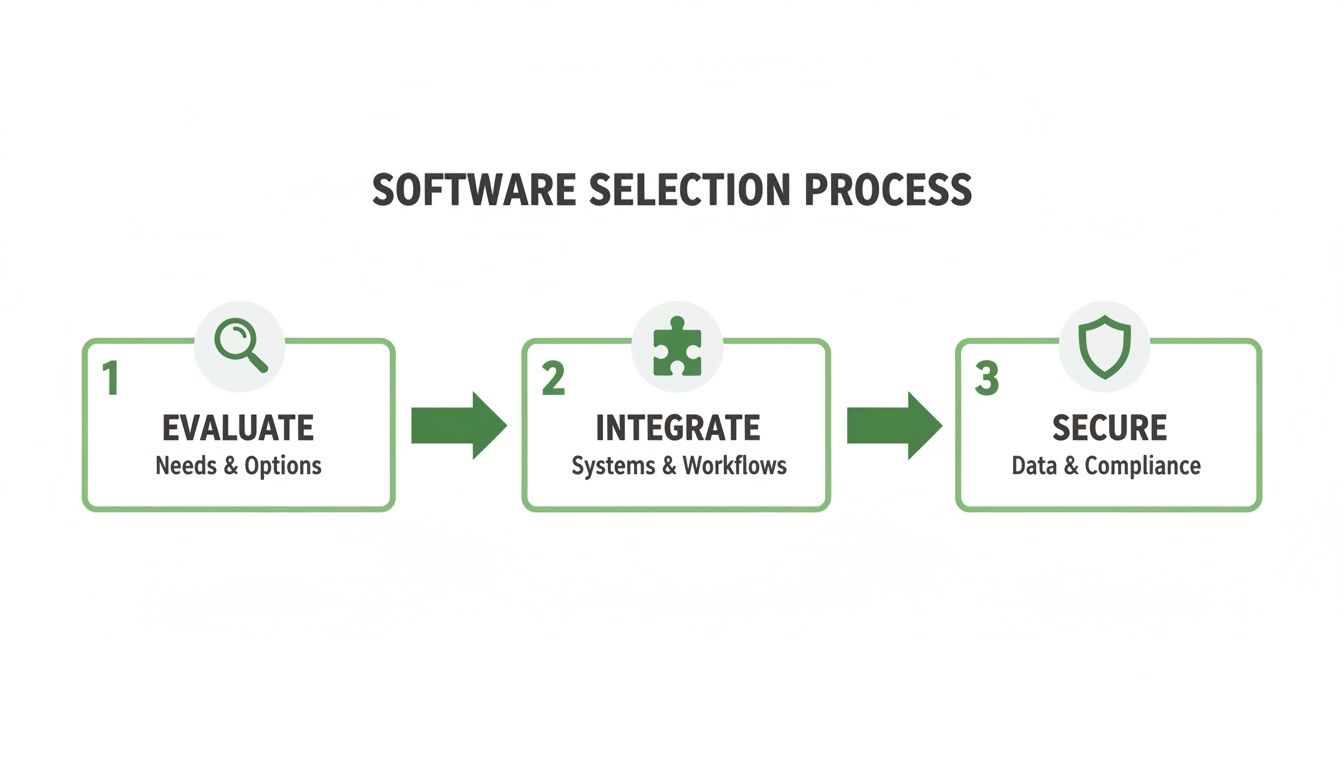
This process highlights that a successful move isn't just about the data. It's also about choosing a tool that fits your existing workflows and meets your security standards.
Why Making the Switch Matters More Than Ever
Yes, the relief from admin headaches is a massive plus, but the strategic advantages are where the real value lies. In the UK, just under 61% of workers didn't use all of their annual leave in 2023. That left a staggering 18 million employees with unused holiday entitlement.
This isn’t just a number; it represents hidden business costs from rising fatigue, an increased risk of sickness, and complex financial liabilities when people leave. A digital system gives you the real-time data needed to get a handle on this.
Moving to a digital system transforms leave management from a reactive chore into a proactive, strategic tool. It allows you to easily track leave usage, gently nudge employees to take well-deserved breaks, and give your finance team precise data on accrued holiday liabilities—a task that is practically impossible with fragmented spreadsheets.
Your Top Questions Answered
Moving to a dedicated system for managing leave always sparks a few questions. That's completely normal. Before making any change, you want to be sure it's the right one. Let's walk through the most common queries we hear from HR managers and business owners, giving you the straight answers you need.
How Secure Is Our Employee Data in a Cloud-Based System?
This is usually the first question people ask, and rightly so. Handing over sensitive employee information can feel like a big step, but a reputable leave management platform is built with security as its number one priority.
Think of it this way: your current spreadsheet is like keeping cash in a desk drawer. It's accessible, but it’s also vulnerable to being lost, corrupted, or seen by the wrong person. A secure cloud system is more like a bank vault. It's designed from the ground up to protect what's inside.
Platforms like Leavetrack use secure cloud hosting with daily backups, which means your data is often much safer than it would be sitting on a single computer in your office. All the information sent back and forth is encrypted, and strict permissions mean people only see what they’re supposed to see. This whole approach is designed to meet UK data protection laws like GDPR, creating a fortress for your leave records.
Can the System Handle Part-Time Staff and Public Holidays?
Yes, absolutely. In fact, this is where a proper system really shines and leaves spreadsheets in the dust. Juggling different work patterns is a classic admin headache, but a good system automates it all.
You can set up custom leave policies for any type of contract. For part-time staff, you simply set their entitlement pro-rata based on the hours or days they work, and the system does the maths for you. No more error-prone calculations every time someone books a day off; it just works.
Public holidays are just as simple. A good system comes pre-loaded with UK public holiday calendars for England, Scotland, Wales, and Northern Ireland. You just assign the right one to your staff, and the system automatically takes those days into account. It guarantees fairness and accuracy for everyone.
A key strength of a dedicated system is its ability to manage complexity without creating more admin. It applies your unique business rules consistently, ensuring every employee, regardless of their contract, is treated fairly and accurately.
How Long Does It Take to Implement a New System?
For most small to medium-sized businesses, you'll be up and running much faster than you think. This isn't a massive IT project that will drag on for months. Most companies can get set up in a matter of hours.
The whole process usually breaks down into three straightforward stages:
- Data Import: First, you upload your list of employees. Most systems let you do this with a simple CSV file, so it's over in minutes. The only thing that might take a little time is tidying up your existing spreadsheet to make sure the data is clean.
- Policy Configuration: Next, you tell the system how your company works. You'll define your leave types (holiday, sick, etc.) and set up who needs to approve requests for different teams.
- Team Onboarding: Finally, you invite your team. Because these platforms are so intuitive, there’s hardly any training needed. A quick email to the team is often all it takes for them to get started.
The whole point is to get you seeing the benefits from day one, without causing any major disruption to your business.
What Kind of Reporting and Analytics Can We Expect?
This is where a leave management system goes from being a handy admin tool to a genuine strategic asset. Instead of fighting with formulas and filters in a spreadsheet, you get instant reports that give you a crystal-clear view of absence trends.
This is a huge leap forward from manual tracking, where all that valuable data is effectively buried. With a proper system, you can expect to see several key reports at the click of a button:
- Individual Leave Balances: See exactly how much holiday someone has taken and what they have left for the year.
- Team Absence Calendars: Get a simple, visual overview of who is off and when, making resource planning a breeze.
- Company-Wide Trend Reports: Spot patterns in an instant. Are sick days creeping up in a specific department? You'll know right away and can address potential burnout before it becomes a problem.
Even better, you can filter these reports by team, date range, or leave type. You can also export the data to make payroll processing faster and more accurate. This isn't just about saving time; it's about making smarter decisions to support your team's wellbeing and keep the business running smoothly.
Ready to see how a dedicated leave management system can transform your business? Leavetrack simplifies everything from requests and approvals to reporting, giving you back valuable time and providing the clarity you need. Explore how Leavetrack can work for your team today.